BLE Hero Workbench™
Bluetooth® LE tooling, right alongside your project in VS Code
Bluetooth LE bring-up scatters across disconnected tools, and the hours go to moving between them instead of building. BLE Hero Workbench puts development, debugging, testing and automation in one place inside VS Code. Harald™, who can operate Hero Workbench for you, turns all of it into a conversation: describe a workflow and it's built, say what you want done and it's running on real devices, hand over documentation and Harald writes the parser, ask what failed and Harald walks the logs to find out.
We are letting people in a batch at a time. Already have an account? Sign in.
Bluetooth development shouldn't slow down your product development
Bluetooth LE can be difficult to develop, test and debug. Engineers often work across disconnected tools and workflows to discover devices, inspect GATT, manage pairing, reproduce failures, examine low-level behavior, test firmware and automate repetitive procedures. The result is time spent moving between tools, interpreting data and reconstructing what happened instead of building the product.
Bluetooth complexity, fragmented tools and the specialized knowledge each one demands add up to real friction in product development, consuming engineering time that could otherwise be spent building the product.
BLE Hero Workbench brings these activities into the developer workflow, combining Bluetooth development, debugging, testing and automation in one environment, coupled with years of Bluetooth engineering experience and know-how.
With BLE Hero Workbench, Harald adds an entirely new layer of productivity:
- Describe what you want.
- Harald operates Hero Workbench and helps diagnose what happened.
About BLE Hero Workbench
A professional Bluetooth LE development and debugging environment integrated directly into VS Code.
Our experience
Building Tools for Engineers
Hero Instruments, Inc. develops tools for engineers building and debugging connected products. The BLE Hero product family began in 2018 with mobile tools for Bluetooth development and debugging, now used by thousands of Bluetooth developers with over 175,000 downloads.
BLE Hero Workbench brings an evolved professional patent-pending Bluetooth LE development and debugging environment directly into VS Code on your desktop, leveraging years of embedded and mobile software engineering experience.
The most comprehensive and functional app for BLE that I have ever used.
omg! i rarely take time out rate apps. fantastic.
Built for Your Workflow
Hero Workbench is designed around the way engineers actually develop: build, connect, test, diagnose, automate and repeat without leaving the development environment.
- Scan & Discover Devices
- Explore GATT Services
- Read, Write & Subscribe
- Security, Pairing & Bonding
- Capture HCI Traces
- Automate Visual Workflows
- Emulate Bluetooth LE Peripherals
- Firmware Updates & DFU
- Channel Sounding
- Custom Parsers & Workflow Scripts
Support for LE Audio and Auracast broadcast audio is coming soon
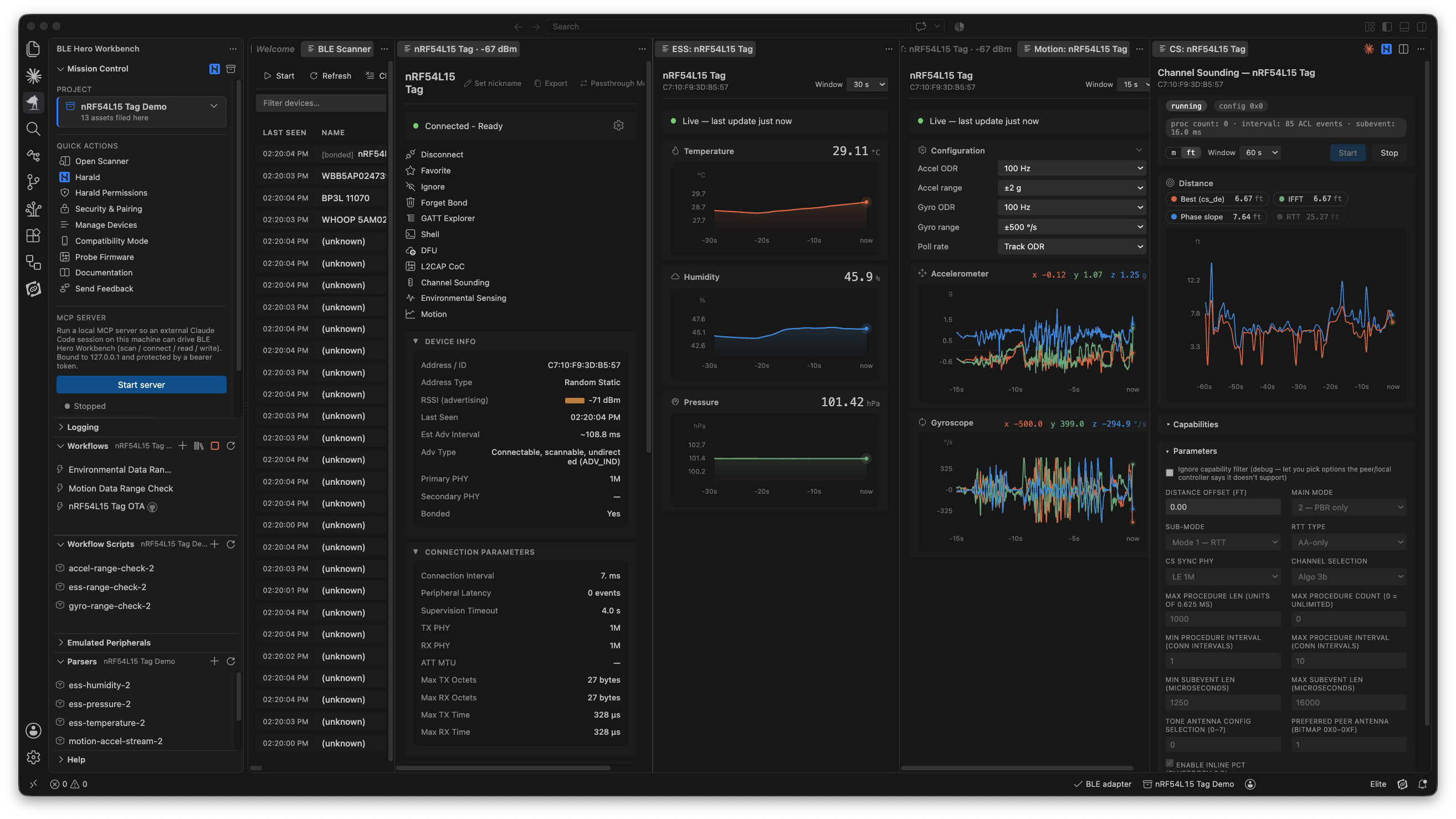
See Hero Workbench in action
From device discovery to debugging and automated testing, Hero Workbench puts Bluetooth LE development directly into VS Code.
Built for developer productivity
Hero Workbench isn't another place to go when Bluetooth becomes a problem. It is part of where you already develop.
For engineers, that means less context switching, faster access to the information needed to diagnose problems, easier reproduction of difficult issues and automation of repetitive bench work.
Instead of manually repeating the same sequence, build it once and run it again. Instead of hunting through multiple tools to understand a failure, work from the device behavior, logs and HCI information available in Hero Workbench.
The goal is simple: spend less time fighting the development process and more time building the product.
Device discovery
One environment for Bluetooth LE development
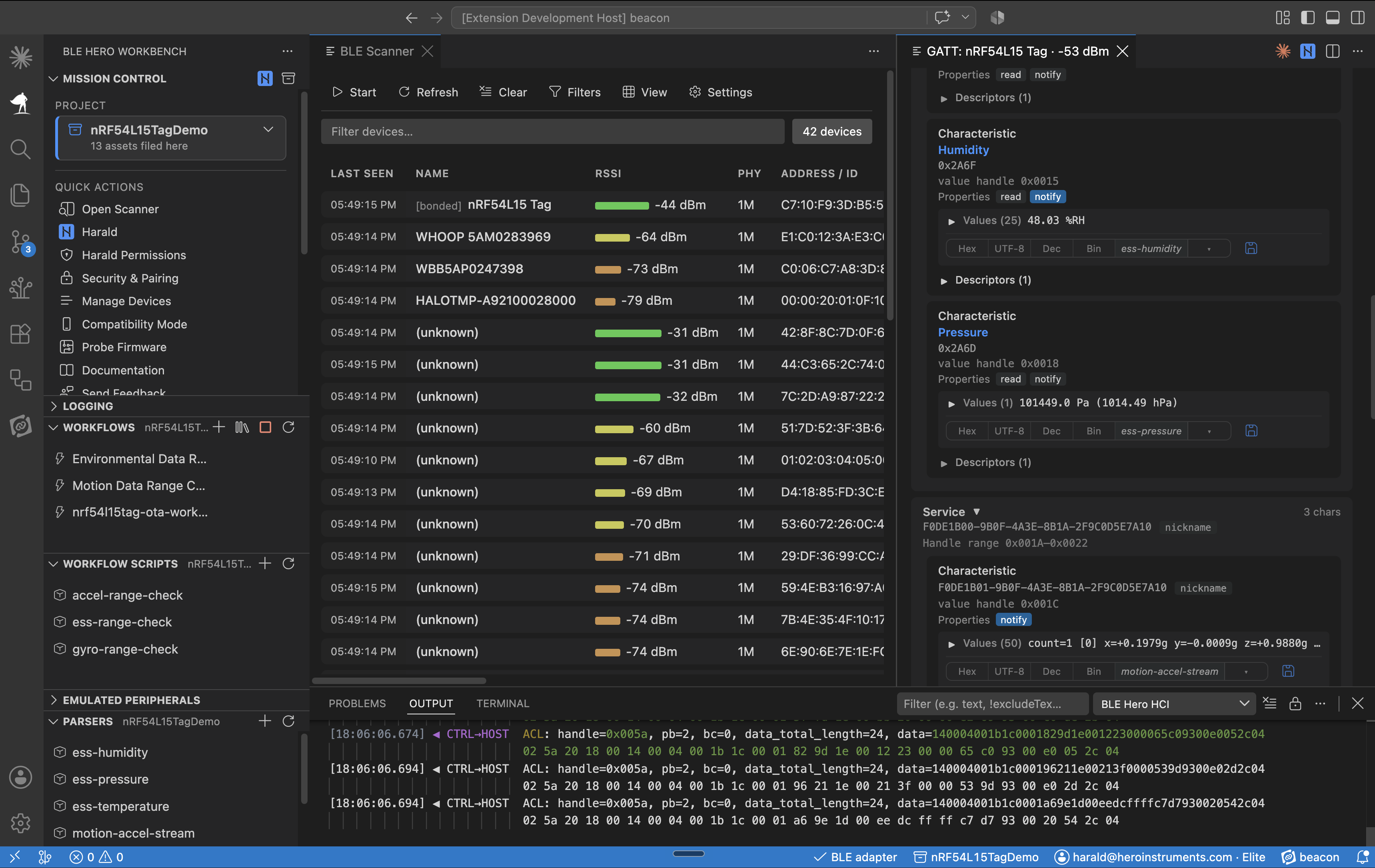
Scan, Connect & Explore
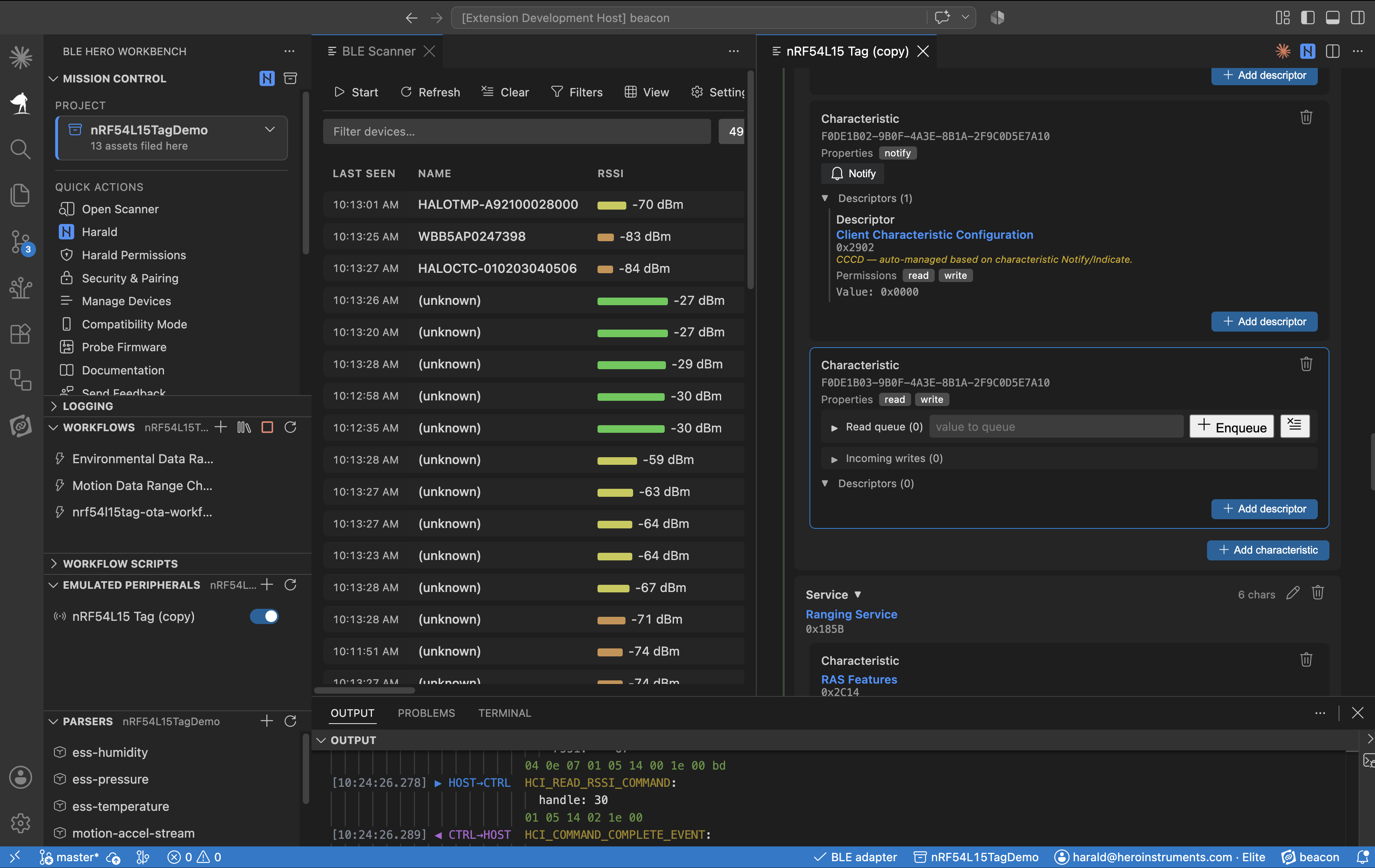
Discover nearby Bluetooth LE devices, connect to them and explore their GATT services and characteristics. Read, write and subscribe to data, and manage pairing, security and bonded devices without leaving VS Code.
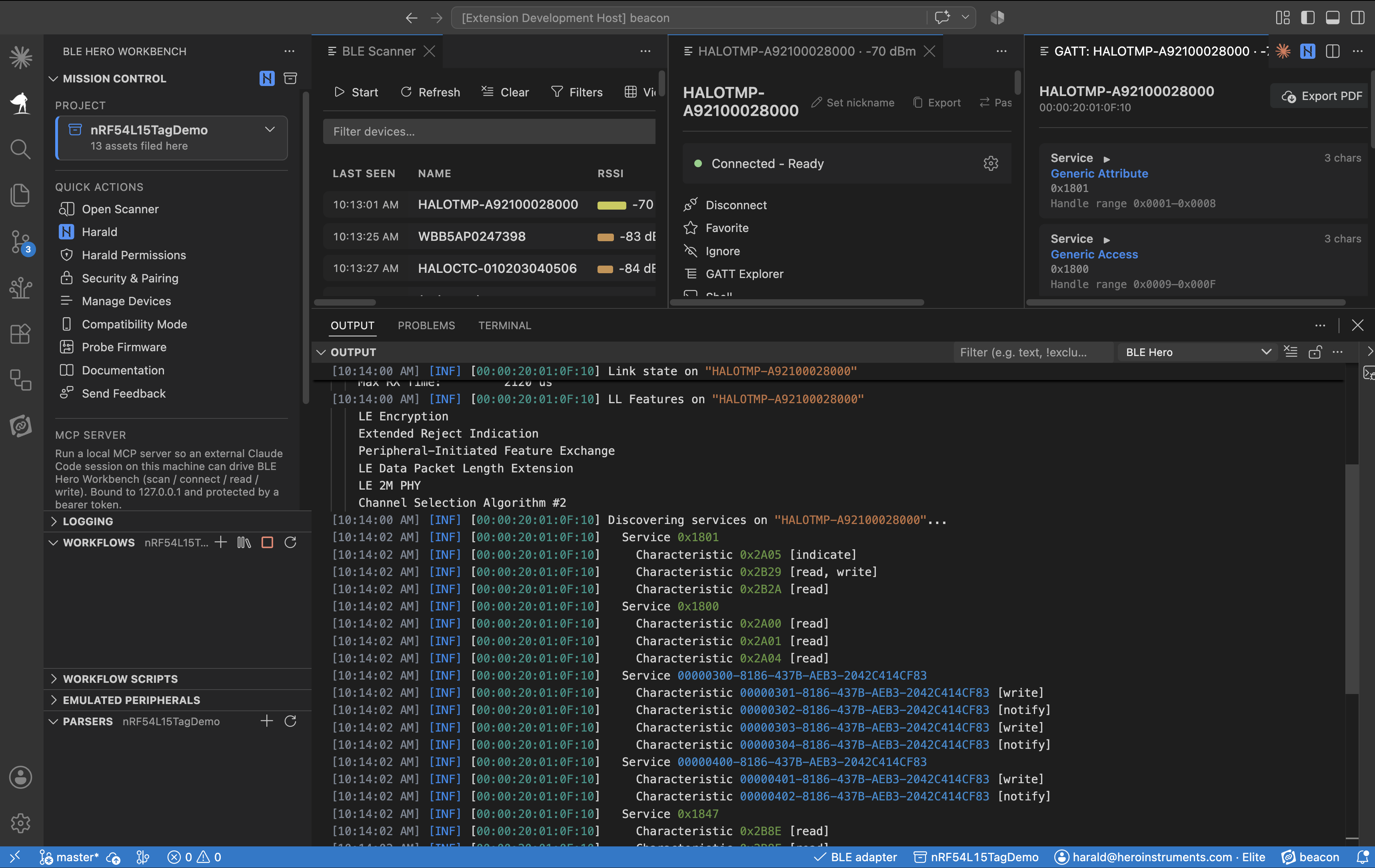
Deep Bluetooth Visibility
See what's happening beneath the application layer with logging and HCI traces. Get the low-level information needed to understand difficult Bluetooth behavior and diagnose problems faster.
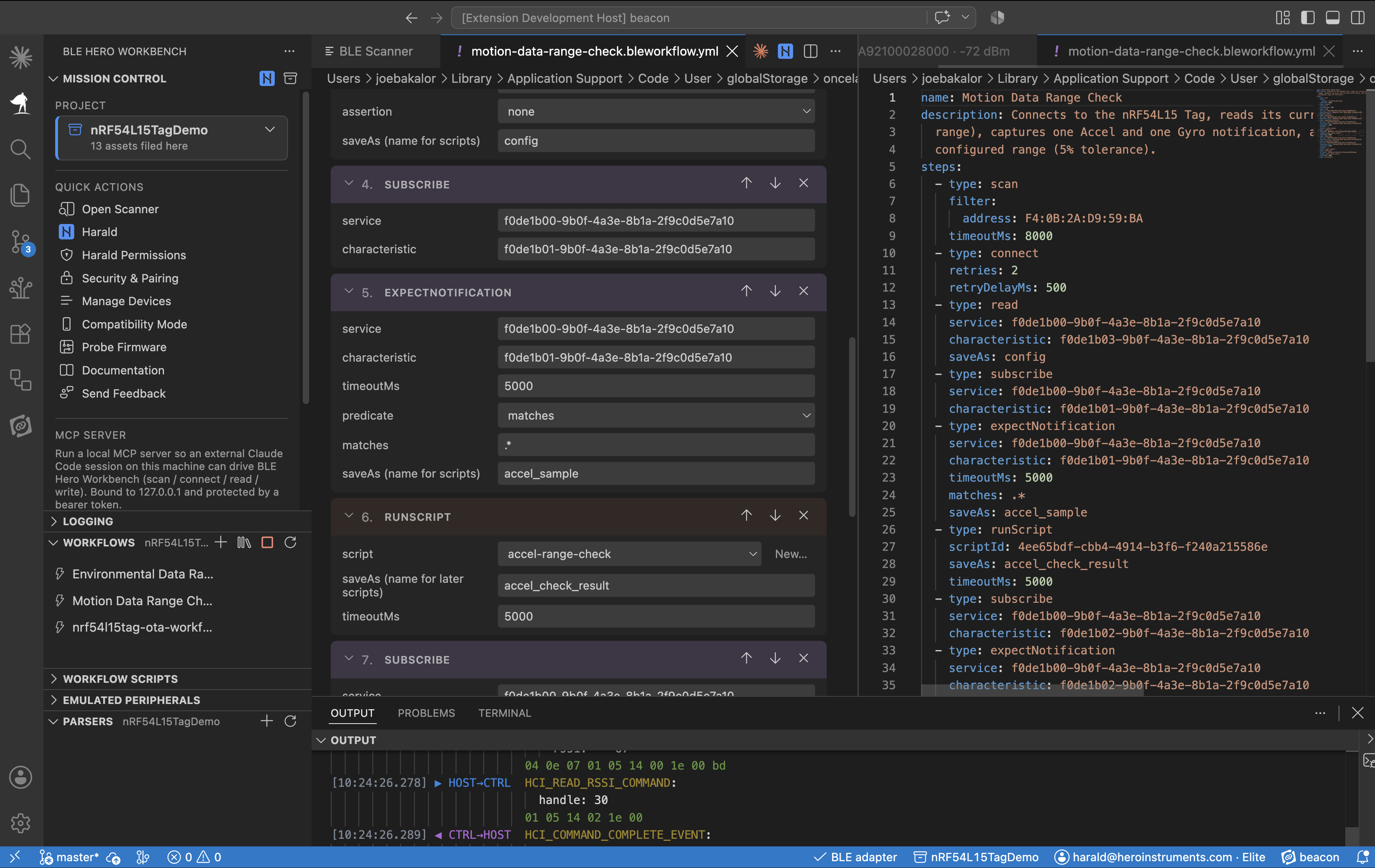
Test & Automate
Build, run and replay Bluetooth LE test sequences using visual workflows. Automate device setup, interactions, firmware updates and regression tests, including SMP / MCUboot and MCUmgr workflows.
Emulate & Interact
Test applications against emulated Bluetooth LE peripherals and use passthrough mode to observe interactions with real devices. Turn physical device behavior into a repeatable test resource that can be reused and shared without requiring the physical hardware for every test.
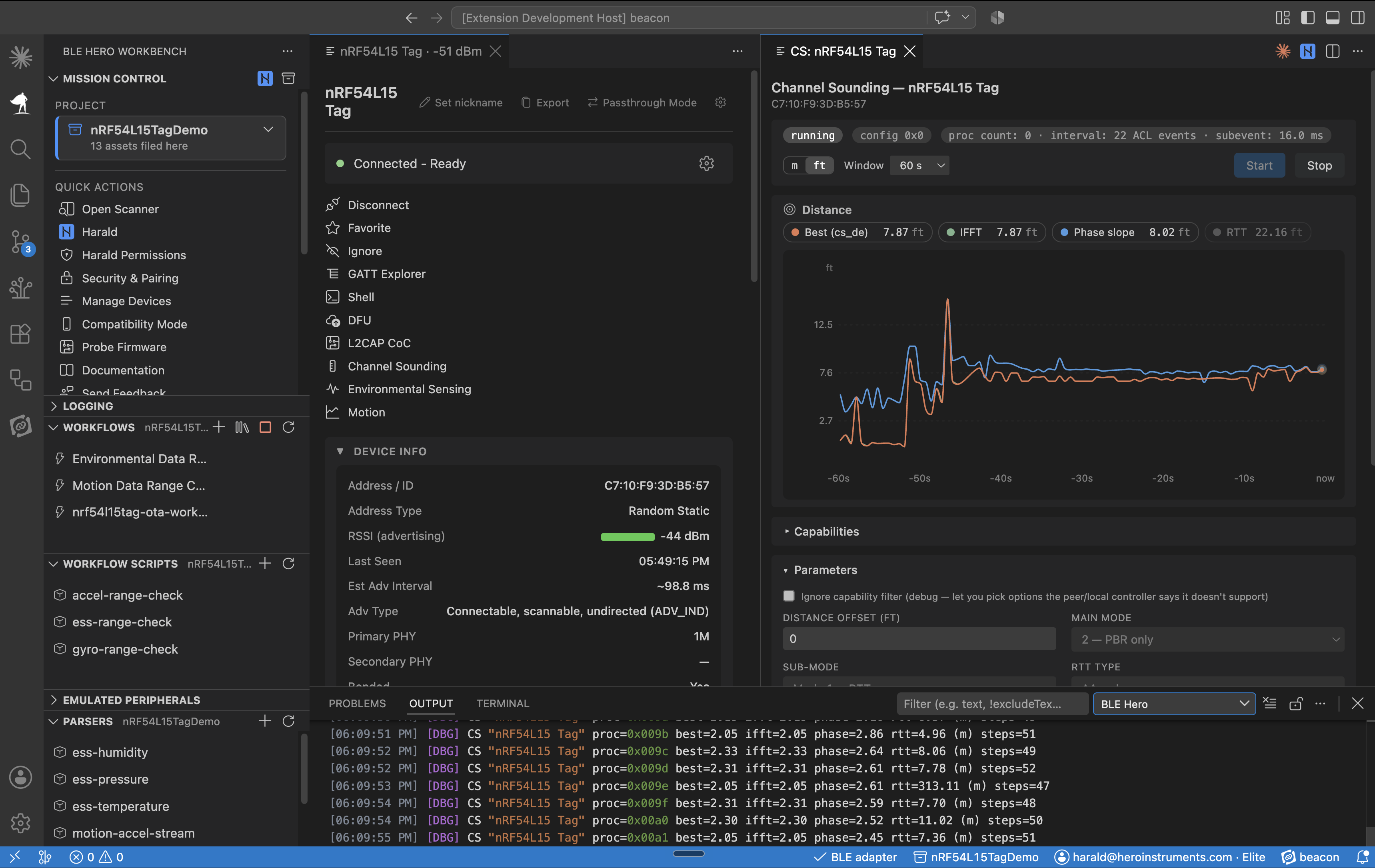
Channel Sounding Test Bench
Configure and control Bluetooth Channel Sounding sessions and inspect round-trip time (RTT) and phase-based ranging (PBR) results in a dedicated Bluetooth test environment.
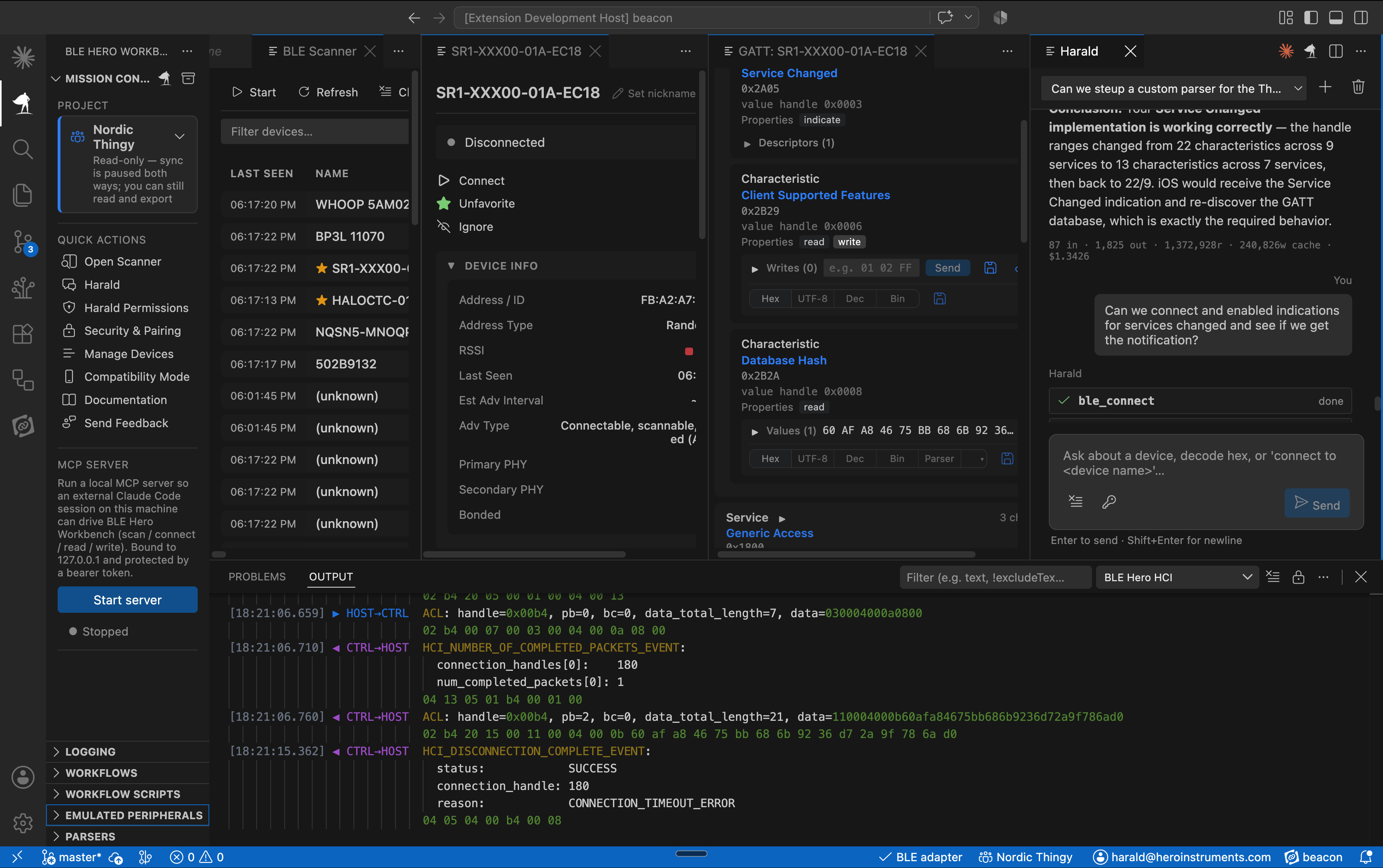
Powerful AI-Enabled Workflows
Use Harald and the local MCP server to connect AI agents and external tools directly to Hero Workbench. Inspect devices, drive workflows and extend Bluetooth development with custom parsers, scripts and integrations for AI-assisted development and automation.
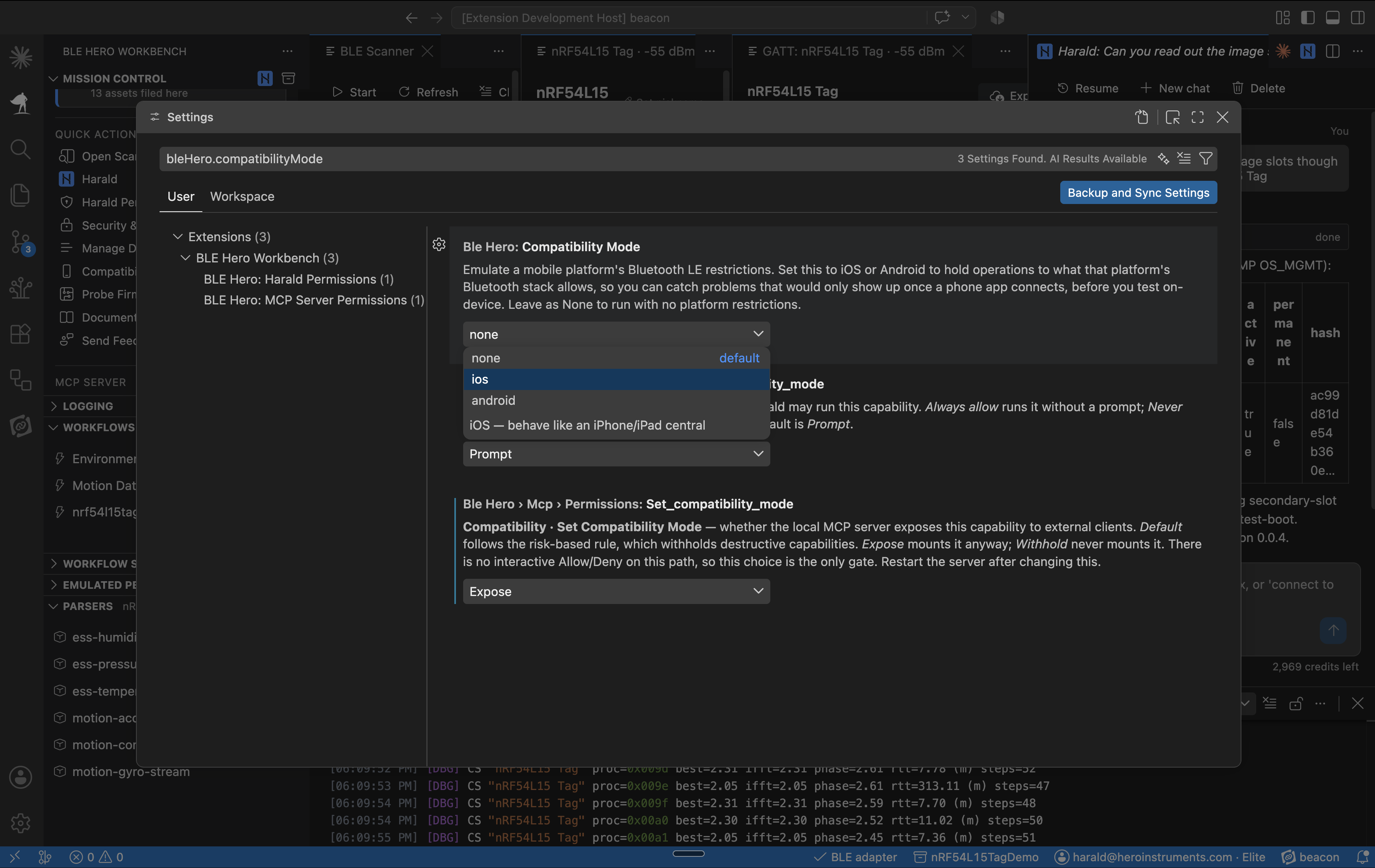
Phone Compatibility Testing
Firmware developers run into a phone's limits all the time without ever seeing the rule behind them: iOS and Android each constrain the PHY, ATT MTU, connection interval, and pairing a peripheral can ask for. Compatibility Mode puts those limits in front of you and names the one you crossed, so you fix it yourself instead of hearing about it from a mobile developer whose app does not work.
Everything you need to ship Bluetooth LE
Scan & explore
Discover nearby Bluetooth LE devices and browse their GATT services (read, write, subscribe) without leaving VS Code.
Workflows
Build Bluetooth LE test sequences in a visual editor, then reduce the setup you repeat all day to one click: firmware updates, device setup, regression checks, soak tests.
Security & pairing
Enforce LE Secure Connections and MITM protection, manage bonded devices, and inspect pairing.
Peripheral passthrough
Sit between a real device and the app connecting to it, and record every read, write, subscribe, and notification. Devices that require pairing included.
Harald, the Bluetooth LE agent
Turn a plain-language request into a complex sequence of real actions, under your control.
- Knows Bluetooth LE by the spec and by years of real-world experience.
- Operates Hero Workbench for you: scan, connect, read and write, run workflows.
- Diagnoses failures from the data: when a connection, throughput test, or DFU fails, Harald reviews the logs and HCI trace and tells you why.
- You stay in charge: set every action Harald can take (writes, connects, pairing, DFU, reset) to prompt, always allow, or never.
DFU firmware updates
Push a firmware update to your device over SMP / MCUboot without leaving VS Code, and drop into an interactive MCUmgr shell when you need lower-level control.
Custom parsers
Write a quick Python script and assign it directly to a characteristic. It decodes the incoming data on the fly, so you read values in their intended format instead of raw bytes.
Emulated peripherals
Stand up virtual Bluetooth LE devices with custom GATT to test your app before hardware exists.
Compatibility Mode
Hold Hero Workbench to what an iPhone or an Android phone actually allows, so a PHY, MTU, connection interval, or pairing your app would be refused on the phone is refused here first, with the reason.
Channel Sounding
A test bench for Channel Sounding, not just a distance readout: configure the session parameters, run the procedure, and inspect the RTT and phase-based ranging.
Local MCP server
Start a local MCP server so external tools and agent sessions can drive Hero Workbench from outside VS Code, down to pushing a firmware update to a device. You choose which capabilities they get.
Built for engineering teams
The value of a development tool extends beyond the engineer sitting at the keyboard. When Bluetooth development, debugging and testing become part of a consistent workflow, teams can reduce repetitive engineering effort, reproduce problems more consistently, and automate regression testing.
That means fewer engineering hours spent diagnosing the same problems, less dependence on individual experts, and more repeatable development and test processes.
Hero Workbench helps turn Bluetooth expertise into a repeatable and efficient engineering capability.
Less repetitive work
Automate recurring development and test procedures to free up engineering time.
More repeatable results
Capture workflows and reproduce complex Bluetooth issues consistently across the team.
Shared expertise
Make specialized Bluetooth knowledge and workflows accessible across the entire team.
Meet Harald™
Other agents write code. Harald talks to hardware.
Harald is the Bluetooth LE agent who runs BLE Hero Workbench for you, and you set exactly what Harald is allowed to do.
Describe what you want, and Harald operates Hero Workbench on real Bluetooth LE hardware.
- Scan & Connect
- Explore GATT
- Read/Write Data
- Run Workflows
- Hardware Control
- Diagnose from Logs
Harald operates the tools.
Harald isn't simply answering questions about Bluetooth. Harald is active in the environment, reviewing logs and HCI traces to help diagnose exactly what happened.
Behind that interaction is years of real-world Bluetooth LE engineering experience, reflected in the tools, workflows and knowledge available through Hero Workbench and Harald.
From instructions to action
You don't need to translate every task into a sequence of individual tool operations.
Tell Harald what you want to accomplish.
Harald can turn that request into a sequence of actions on the actual Bluetooth environment, while showing you each action as it happens.
You request. Harald acts.
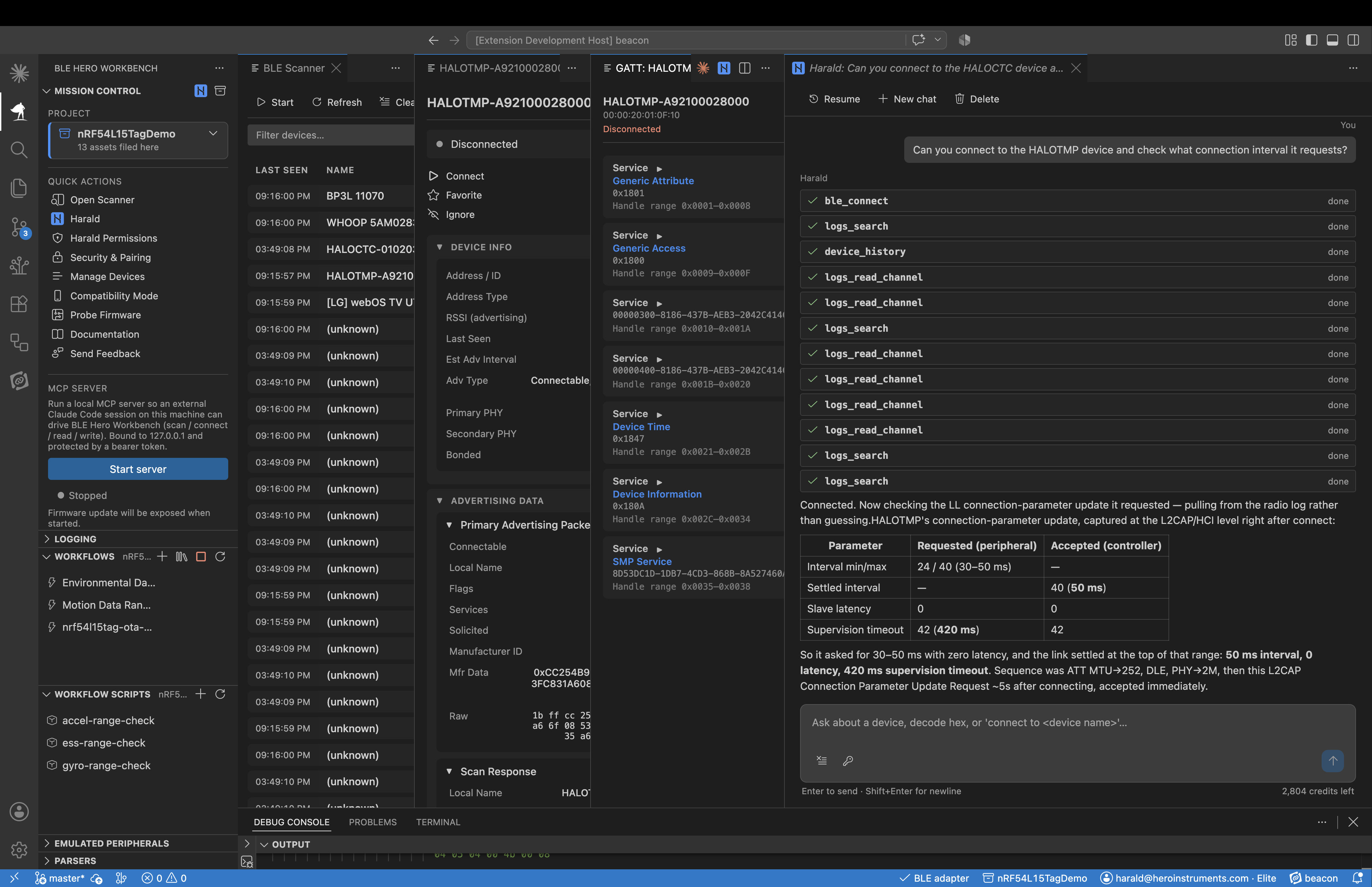
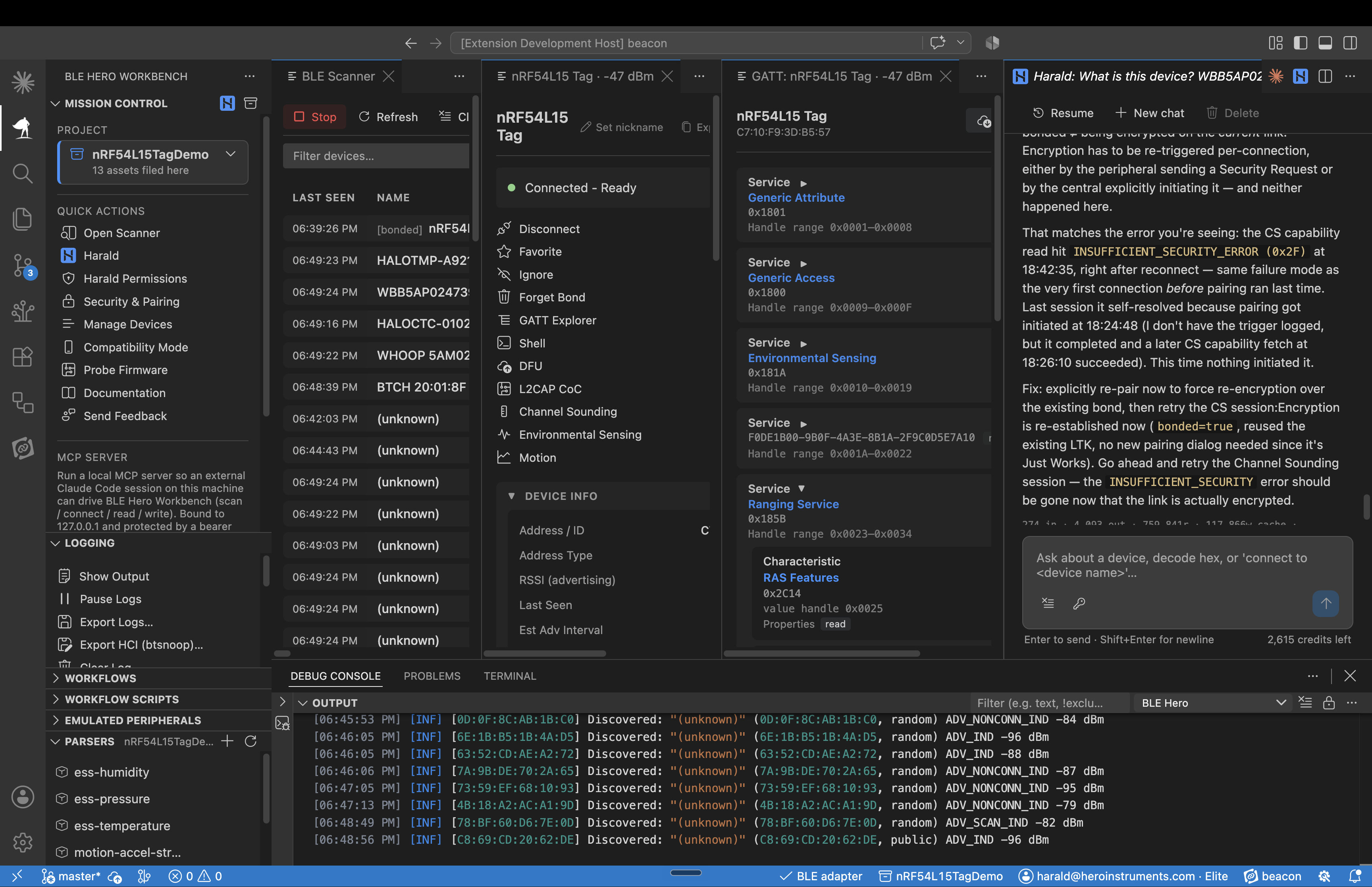
When something fails, Harald investigates
A dropped connection. A pairing failure. A throughput problem. A stalled firmware update.
Harald can review the available logs, HCI trace and interaction history to help reconstruct what happened.
A diagnosis based on what actually happened on the link.
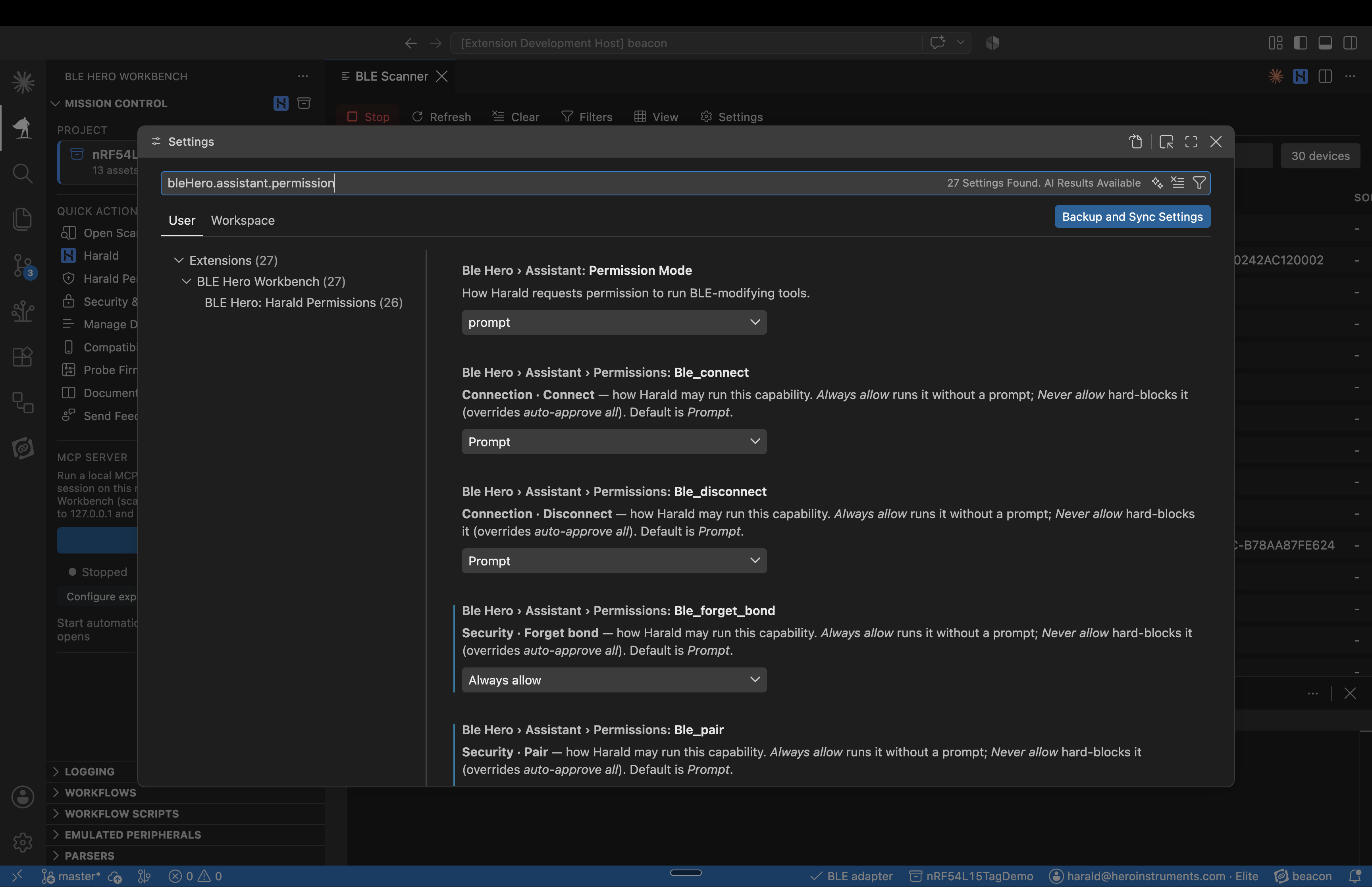
You stay in control
Harald operates real hardware, so control matters.
Set permissions for what Harald can do, from requiring approval for individual operations to automatically allowing routine actions or blocking specific capabilities entirely.
BLE Hero Workbench will grow with your workflow
During beta, we're providing the Elite experience to participating engineers and teams along with the Bluetooth hardware.
Standard
No-cost core Bluetooth LE development
Advanced
Automation, deeper Bluetooth testing and team workflows
Elite
Harald the Bluetooth LE agent, plus a local MCP server for external agent control
Put Hero Workbench to work.
Currently available through our beta program. We send the hardware; you help shape the future of Bluetooth development.
We're proud to have Ezurio as our launch partner, offering hardware at no cost to our beta users, while supplies last.
